What you're actually tracking
Strike tracking isn't just a countdown of peremptory strikes. During jury selection, a prosecutor needs to track multiple categories simultaneously:
Peremptory strikes — the discretionary challenges each side uses to remove jurors without stating a reason. Most jurisdictions give each side a fixed number. Running out early — or miscounting and thinking you have one left when you don't — can decide who ends up in the box.
Cause challenges — jurors removed because they cannot be fair or impartial. These don't count against your peremptory total, but they change who's in the box and who moves up from the panel. Every cause challenge reshuffles the math.
Hardship excuses and failures to appear — jurors removed before voir dire questioning even starts. These shrink the available panel and may change the strike zone in strike-panel jurisdictions.
Defense strikes — you need to know which jurors the other side is removing, not just your own. The interaction between state and defense strikes determines who actually ends up on the jury.
Why paper strike sheets break down
A paper strike sheet works when you're the only person tracking, the panel is small, and the pace is slow. It breaks down in every other scenario.
Shared information. If your second chair strikes a juror while you're questioning the panel, you don't know about it until there's a pause long enough to pass a note. In a fast-moving voir dire, that pause might not come until after you've made a decision based on a stale count.
Replacement tracking. When a juror is struck and a new one fills the seat, the paper chart has to be erased and rewritten — or a new sheet started. The more strikes, the messier it gets. By the third round of strikes in a struck-jury system, the paper is unreadable.
Strike zone visibility. In strike-panel jurisdictions, you need to know which jurors are within range of your remaining strikes. On paper, that's a mental calculation you redo after every strike. Miss it once and you've wasted a peremptory on a juror who was out of reach anyway.
The record. When voir dire is over, your paper strike sheet is a mess of crossed-out names and margin notes. Reconstructing who was struck, by whom, and in what order — which you'll need for Batson challenges or appellate review — means relying on handwriting you can barely read.
What real-time strike tracking looks like
Digital strike tracking solves these problems by keeping a single, shared, always-current record that every member of the trial team can see.
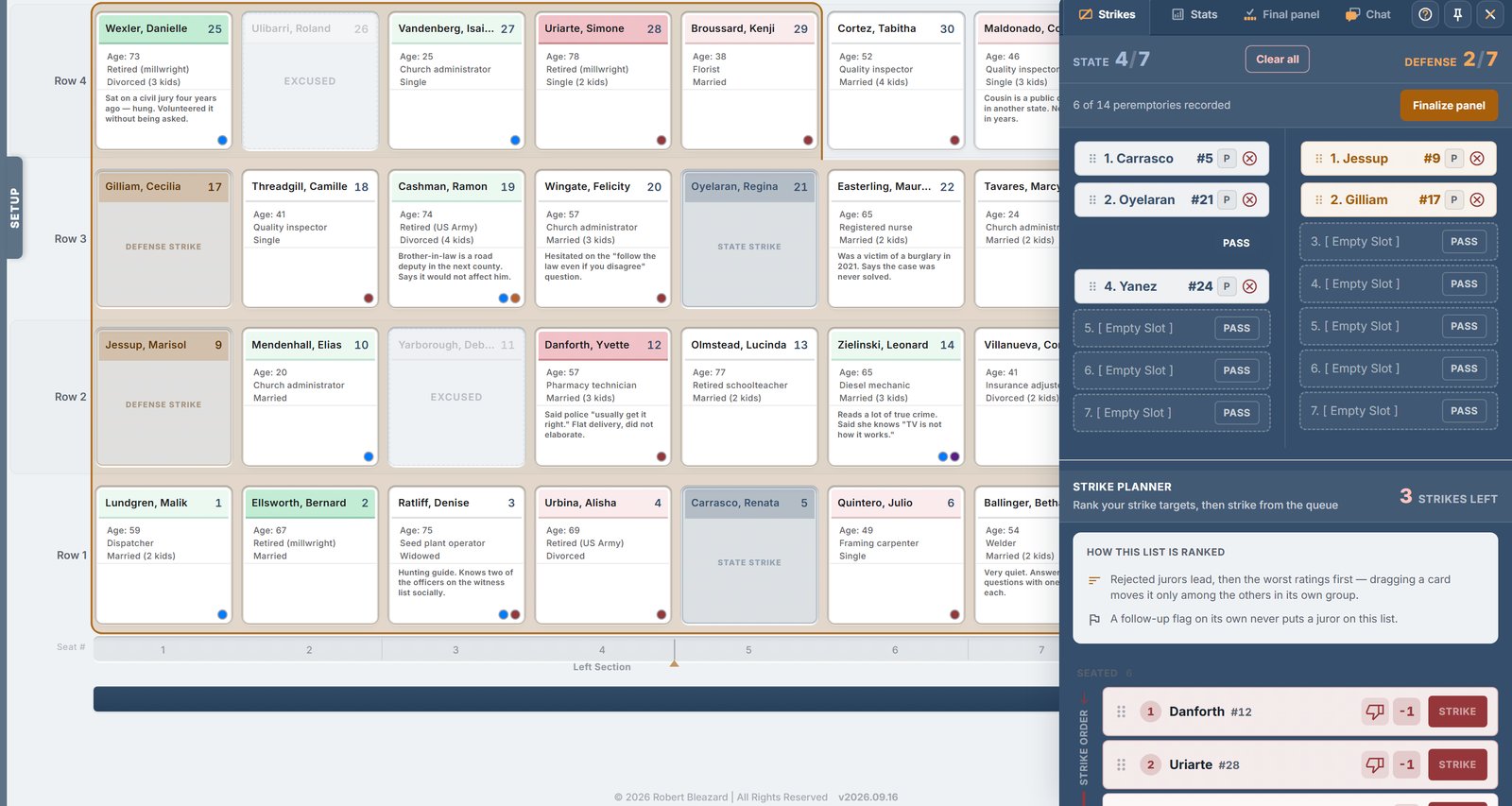
One tap to strike. Select the juror, select the strike type — peremptory, cause, hardship — and the seating chart updates for everyone. The remaining count adjusts automatically. The next juror fills the seat if the system is configured for your jurisdiction's rules.
State and defense tracked separately. Both sides' strikes are visible in the same interface. You always know how many the defense has used, how many remain, and which jurors they've targeted.
The count is always right. No mental math. No reconciling your sheet with co-counsel's sheet during a recess. The number on screen is the number. Every strike, every cause challenge, every excuse — already factored in.
Pass-round tracking. In struck-jury systems, the software tracks whose turn it is, who has passed, and how many strikes remain in each round. This is the bookkeeping that's hardest to do on paper and most dangerous to get wrong.
Batson documentation
A Batson challenge requires the striking party to articulate a race-neutral reason for every challenged peremptory strike — immediately, on the record, in open court. The prosecutors who handle this well aren't the ones with the best memory. They're the ones who documented the reason for each strike as they made it.
Strike tracking software lets you attach a reason to each peremptory strike at the moment you exercise it. When the challenge comes, the information is already there — not reconstructed from memory under pressure.
What to look for in a strike tracker
Jurisdiction-aware. Strike-panel and struck-jury systems work differently. The software should support the system your jurisdiction uses — not force you into a generic model.
Real-time sync. If your co-counsel strikes a juror, you should see it immediately — not after a refresh, not after a sync, not after someone tells you.
Integrated with the seating chart. The strike tracker shouldn't be a separate spreadsheet. It should be part of the same view where you see the jury box, the panel, and the juror profiles. Strike a juror and the chart updates. One workspace.
Exportable. When voir dire ends, you should be able to export the full strike history — who was struck, by whom, what type, in what order — as part of the trial record.
JuryPanel tracks peremptory strikes, cause challenges, hardship excuses, and pass rounds in real time — synced across your entire trial team, integrated into the jury seating chart, and exportable as a PDF record. Built by a prosecutor who got tired of losing count.
Request a demo and see strike tracking that doesn't break.